Pilot Project Part 2
Implementing documentation storage with RustFS and backup with Restic
Introduction (Draft)
In this part, you transform the architecture from Part 1 into a practical, testable implementation for document storage and backup.
The goal is simple: your VMS can keep working after mistakes, outages, or node loss because your data model, storage layout, and backup strategy are operationally sound.
This part focuses on:
- Storing document binaries in RustFS with predictable structure.
- Treating PostgreSQL as the system of record for metadata and business data.
- Backing up all critical assets with Restic using encrypted snapshots.
- Verifying restore procedures before calling the pilot "ready."
Architecture Overview
                    VMS
                     │
        ┌────────────┼────────────┐
        ▼            ▼            ▼
   PostgreSQL      RustFS      Windmill
   system data     documents   workflows
        │            │            │
        └────────────┼────────────┘
                     │
                  Restic
                BACKUP LAYER
                     │
             ┌───────┴────────┐
             ▼                ▼
       Off-site S3       Secondary storage
       / B2 / R2         / NAS / VPS
RustFS technical choices
Restic is particularly appropriate because it gives us encrypted, deduplicated, snapshot-based backups, with retention, integrity checking and restoration capabilities. Its current documentation also exposes scripting/JSON output, which makes it easy to integrate with monitoring and automation.
RustFS as the primary document repository:
- Provides a structured and versioned storage for documents.
- Ensures data integrity and consistency.
- Facilitates easy integration with backup solutions like Restic.
- Supports automation and monitoring through its API.
Practical storage layout hints
Use a deterministic prefix model so humans and scripts can navigate data quickly:
documents/
  vessels/{vesselId}/
    certificates/
    inspections/
    reports/
  customers/{customerId}/
    contracts/
Recommended conventions:
- Keep object keys immutable after write (append new versions rather than overwrite).
- Store metadata (owner, type, timestamps, hash, status) in PostgreSQL, not only in object key names.
- Include a checksum (for example SHA-256) in DB metadata for verification and dedup workflows.
- Normalize file names to avoid whitespace and locale edge cases in automation scripts.
RustFS
  │
  ├── original PDFs
  ├── photographs
  ├── inspection documents
  └── derived files
Use of Restic as the independent backup mechanism ensures that all data, including RustFS documents, PostgreSQL system data, and Windmill workflows, are securely backed up with encryption, deduplication, and snapshot-based versioning. This provides an additional layer of data protection and facilitates disaster recovery. Restic's repository is not simply a collection of copies of files. It maintains snapshots and uses deduplication, which is useful for your document archive because you may have:
- Multiple versions of the same document.
- Large files with minor changes.
- Redundant copies of documents across different directories.
Vessel
 ├── Certificate v1
 ├── Certificate v2
 ├── Inspection report
 ├── revised inspection report
 └── photographs
Propose architecture
The proposed architecture for the pilot project integrates RustFS as the primary document repository and Restic as the backup solution. RustFS ensures structured and versioned storage for documents, while Restic provides encrypted, deduplicated, and snapshot-based backups. This combination ensures data integrity, security, and ease of recovery in case of data loss.
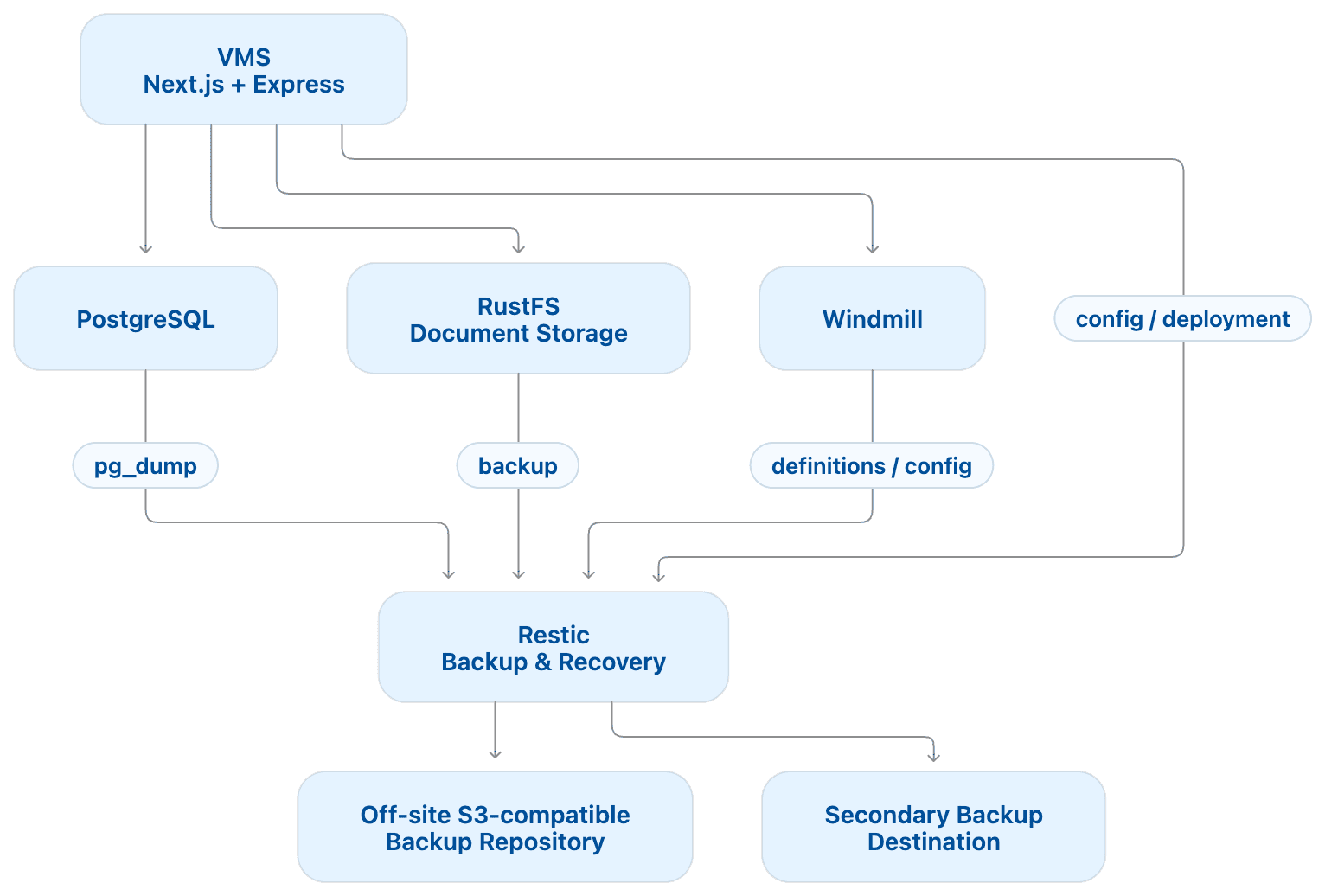
Why this split works in real operations
- VMS + PostgreSQL keep business truth and auditability.
- RustFS handles large binary storage without inflating database size.
- Windmill executes workflows, retries, and scheduled tasks.
- Restic provides independent, encrypted recovery points from accidental deletion or infrastructure failure.
This split limits blast radius: if one service fails, others keep their role clear and recoverable.
Implementation Checklist
Use this as your minimum acceptance checklist for the pilot:
- RustFS bucket/container created with least-privilege access keys.
- Upload and retrieval from VMS confirmed for at least one document type.
- PostgreSQL dump process scripted and tested (
pg_dumpsuccess + non-zero file size). - Windmill workflow definitions exported/versioned.
- Restic repository initialized and encrypted key stored securely.
- Backup job runs on schedule and writes snapshots.
- Restore drill completed (single file + database dump restore).
- Backup logs and failure alerts visible to the team.
Backup Strategy (Practical Baseline)
Start with a conservative policy and adjust after real usage metrics:
- Snapshot frequency: every 6 hours for pilot workloads.
- Retention: keep daily 14, weekly 8, monthly 6 snapshots.
- Verification: run
restic checkweekly. - Off-site copy: primary S3-compatible target + secondary destination.
Example retention command:
restic forget --prune --keep-daily 14 --keep-weekly 8 --keep-monthly 6Copy/paste starter script (backup + prune + check)
Use this script as a practical baseline for pilot environments.
It creates a PostgreSQL dump, backs up all required paths with Restic, applies retention, and verifies repository integrity.
#!/usr/bin/env bash
set -euo pipefail

# -----------------------------
# Required environment variables
# -----------------------------
# RESTIC_REPOSITORY="s3:https://s3.example.com/your-bucket"
# RESTIC_PASSWORD_FILE="/run/secrets/restic_password"
# AWS_ACCESS_KEY_ID="..."
# AWS_SECRET_ACCESS_KEY="..."
# AWS_DEFAULT_REGION="us-east-1"
#
# PGHOST="127.0.0.1"
# PGPORT="5432"
# PGUSER="vms_user"
# PGPASSWORD="..."
# PGDATABASE="vms"
#
# RUSTFS_DATA_PATH="/srv/rustfs/data"
# WINDMILL_EXPORT_PATH="/srv/windmill/exports"
# VMS_CONFIG_PATH="/srv/vms/config"
# BACKUP_WORKDIR="/var/backups/vms"

timestamp="$(date -u +%Y%m%dT%H%M%SZ)"
workdir="${BACKUP_WORKDIR:-/var/backups/vms}"
pg_dump_file="${workdir}/postgres-${timestamp}.sql.gz"

mkdir -p "${workdir}"

echo "[1/5] Creating PostgreSQL dump..."
pg_dump \
  --format=plain \
  --no-owner \
  --no-privileges \
  --dbname="${PGDATABASE}" \
  | gzip > "${pg_dump_file}"

test -s "${pg_dump_file}" || { echo "PostgreSQL dump is empty"; exit 1; }

echo "[2/5] Running restic backup..."
restic backup \
  "${pg_dump_file}" \
  "${RUSTFS_DATA_PATH}" \
  "${WINDMILL_EXPORT_PATH}" \
  "${VMS_CONFIG_PATH}" \
  --tag "vms-pilot" \
  --tag "automated" \
  --json

echo "[3/5] Applying retention policy..."
restic forget --prune \
  --keep-daily 14 \
  --keep-weekly 8 \
  --keep-monthly 6

echo "[4/5] Verifying repository..."
restic check

echo "[5/5] Cleaning temporary local dump..."
rm -f "${pg_dump_file}"

echo "Backup completed successfully at ${timestamp}"
Practical usage hints:
- Run this script first in a staging environment and time the full run.
- Keep
restic checkweekly if runtime is long for large repositories. - Send script output to centralized logs so failures are visible.
- Use dedicated credentials for backup operations only (least privilege).
Companion restore script (snapshot + DB recovery)
Use this script to rehearse recovery from the latest snapshot into a safe restore workspace.
#!/usr/bin/env bash
set -euo pipefail

# -----------------------------
# Required environment variables
# -----------------------------
# RESTIC_REPOSITORY="s3:https://s3.example.com/your-bucket"
# RESTIC_PASSWORD_FILE="/run/secrets/restic_password"
# AWS_ACCESS_KEY_ID="..."
# AWS_SECRET_ACCESS_KEY="..."
# AWS_DEFAULT_REGION="us-east-1"
#
# PGHOST="127.0.0.1"
# PGPORT="5432"
# PGUSER="vms_user"
# PGPASSWORD="..."
# RESTORE_PGDATABASE="vms_restore_test"   # test DB only, never production
#
# RESTORE_WORKDIR="/tmp/vms-restore"

timestamp="$(date -u +%Y%m%dT%H%M%SZ)"
restore_root="${RESTORE_WORKDIR:-/tmp/vms-restore}"
restore_dir="${restore_root}/${timestamp}"

mkdir -p "${restore_dir}"

echo "[1/6] Listing snapshots..."
restic snapshots

echo "[2/6] Restoring latest snapshot to ${restore_dir}..."
restic restore latest --target "${restore_dir}"

echo "[3/6] Locating latest PostgreSQL dump in restored files..."
latest_dump="$(find "${restore_dir}" -type f -name 'postgres-*.sql.gz' | sort | tail -n 1)"
test -n "${latest_dump:-}" || { echo "No restored PostgreSQL dump found"; exit 1; }
test -s "${latest_dump}" || { echo "Restored PostgreSQL dump is empty"; exit 1; }

echo "[4/6] Restoring PostgreSQL dump into test database: ${RESTORE_PGDATABASE}..."
gunzip -c "${latest_dump}" | psql --dbname="${RESTORE_PGDATABASE}"

echo "[5/6] Basic verification queries..."
psql --dbname="${RESTORE_PGDATABASE}" -c "SELECT now() AS restore_checked_at;"

echo "[6/6] Restore drill completed."
echo "Restored files path: ${restore_dir}"
echo "Run your domain checks (record counts/checksums) before cleanup."
Restore hints:
- Always restore into a dedicated test database first.
- Keep restored files until verification is complete, then delete them.
- If restore time exceeds your target RTO, optimize dump size, network path, or schedule.
- Add domain-specific validation queries (for example vessel, document, and workflow counts).
Scheduling examples (cron + systemd)
Choose one scheduler model and standardize it across environments.
Option A: cron (quick start)
Run backups every 6 hours:
0 */6 * * * /usr/local/bin/vms-backup.sh >> /var/log/vms-backup.log 2>&1Run a restore drill weekly (recommended in staging first):
30 3 * * 0 /usr/local/bin/vms-restore-drill.sh >> /var/log/vms-restore.log 2>&1Practical cron hints:
- Use absolute paths for scripts, binaries, and files.
- Export required environment variables in the script or a sourced env file.
- Rotate log files with
logrotateto avoid disk growth.
Option B: systemd timer (recommended for Linux servers)
Service unit example (/etc/systemd/system/vms-backup.service):
[Unit]
Description=VMS backup job (Restic + PostgreSQL dump)

[Service]
Type=oneshot
EnvironmentFile=/etc/vms/backup.env
ExecStart=/usr/local/bin/vms-backup.sh
User=backup
Group=backup
Timer unit example (/etc/systemd/system/vms-backup.timer):
[Unit]
Description=Run VMS backup every 6 hours

[Timer]
OnBootSec=10min
OnUnitActiveSec=6h
Persistent=true

[Install]
WantedBy=timers.target
Enable and verify:
sudo systemctl daemon-reload
sudo systemctl enable --now vms-backup.timer
systemctl list-timers --all | grep vms-backup
Why systemd timers are often better than cron:
- Better observability via
journalctl. - Persistent timers can catch up after reboot.
- Cleaner environment management with
EnvironmentFile.
Example backup.env template (placeholders only)
Use a dedicated environment file for scheduler-driven jobs:
# dotenv file
# /etc/vms/backup.env

# Restic repository + credentials
RESTIC_REPOSITORY="s3:https://s3.example.com/vms-backups"
RESTIC_PASSWORD_FILE="/etc/vms/secrets/restic-password"
AWS_ACCESS_KEY_ID="REPLACE_ME"
AWS_SECRET_ACCESS_KEY="REPLACE_ME"
AWS_DEFAULT_REGION="us-east-1"

# PostgreSQL source
PGHOST="127.0.0.1"
PGPORT="5432"
PGUSER="vms_user"
PGPASSWORD="REPLACE_ME"
PGDATABASE="vms"

# Backup sources
RUSTFS_DATA_PATH="/srv/rustfs/data"
WINDMILL_EXPORT_PATH="/srv/windmill/exports"
VMS_CONFIG_PATH="/srv/vms/config"
BACKUP_WORKDIR="/var/backups/vms"
backup.env handling tips:
- Restrict file permissions (
chmod 600) and owner (rootor dedicated backup user). - Keep secret files (for example
RESTIC_PASSWORD_FILE) outside Git and deployment artifacts. - Rotate credentials regularly and after security incidents.
Pre-flight checklist (before first scheduled run)
Run these checks manually once before enabling cron/systemd timers:
# 1) Validate environment file permissions
ls -l /etc/vms/backup.env

# 2) Validate Restic repository access
set -a
source /etc/vms/backup.env
set +a
restic snapshots

# 3) Validate PostgreSQL access
PGCONNECT_TIMEOUT=5 psql --dbname="$PGDATABASE" -c "SELECT 1;"

# 4) Dry-run PostgreSQL dump size check
mkdir -p "${BACKUP_WORKDIR}"
pg_dump --format=plain --no-owner --no-privileges --dbname="$PGDATABASE" | gzip > "${BACKUP_WORKDIR}/preflight.sql.gz"
test -s "${BACKUP_WORKDIR}/preflight.sql.gz" && echo "pg_dump preflight OK"

# 5) Cleanup preflight artifact
rm -f "${BACKUP_WORKDIR}/preflight.sql.gz"
If any command fails, fix credentials/paths first; do not enable scheduler jobs until all checks pass.
What to back up explicitly
- PostgreSQL dumps (logical exports).
- RustFS document data path(s).
- Windmill exported definitions/configuration.
- Deployment/configuration files required to rebuild the stack.
What not to rely on
- Do not rely only on volume-level snapshots without application-aware exports.
- Do not rely on a single backup destination.
- Do not assume backups are valid until restore is tested.
Security and Key Management Hints
- Keep
RESTIC_PASSWORDoutside source control (secret manager or host secret store). - Rotate access keys periodically and after incident response.
- Restrict backup credentials to write/list/read only where possible.
- Store one offline copy of recovery material (password or key escrow process) for disaster scenarios.
Restore Drill (Must-do for Pilot Sign-off)
Run at least one timed drill before moving to Part 3:
- Pick a recent snapshot.
- Restore one sample vessel folder from RustFS backup to a temporary location.
- Restore one PostgreSQL dump into a test database.
- Compare restored checksums/record counts with expected values.
- Record total recovery time and blockers.
If recovery takes too long or is error-prone, update scripts now; do not postpone this to production.
Objectives
By the end of this part, you should be able to:
- Implement a clean storage boundary between metadata (PostgreSQL) and binaries (RustFS).
- Configure encrypted Restic backups for database, documents, and workflow artifacts.
- Apply practical retention and verification policies.
- Execute and document a basic restore drill with measurable recovery time.
- Identify operational risks (missing exports, key handling, single-target backups) and mitigate them.
Prerequisites
Before starting this part of the pilot project, you should have:
- A running VMS stack from Part 1 (or equivalent local/staging environment).
- Access to PostgreSQL, RustFS storage paths, and Windmill workflow exports.
- Basic shell access to run backup/restore commands.
- A reachable S3-compatible backup endpoint (or temporary pilot equivalent).
- A secure place to store backup credentials and recovery secrets.
Next Step
Continue to 06-pilot-project-part3.mdx to complete hardening, monitoring, and handoff.