Modern DMZ Architecture Overview
An overview of modern DMZ architecture, its role in business security, implementation patterns, and best practices for physical servers in a DMZ.
Modern DMZ Architecture Overview
Introduction
In a modern business network, a DMZ (Demilitarized Zone) remains a critical architectural standard for isolating public-facing services from sensitive internal data.
Core Role in Business Security
- Buffer Zone: It acts as a subnetwork between the untrusted internet and the private corporate LAN.
- Service Isolation: Businesses place web, email, DNS, and FTP servers in the DMZ so external users can access them without touching the internal network.
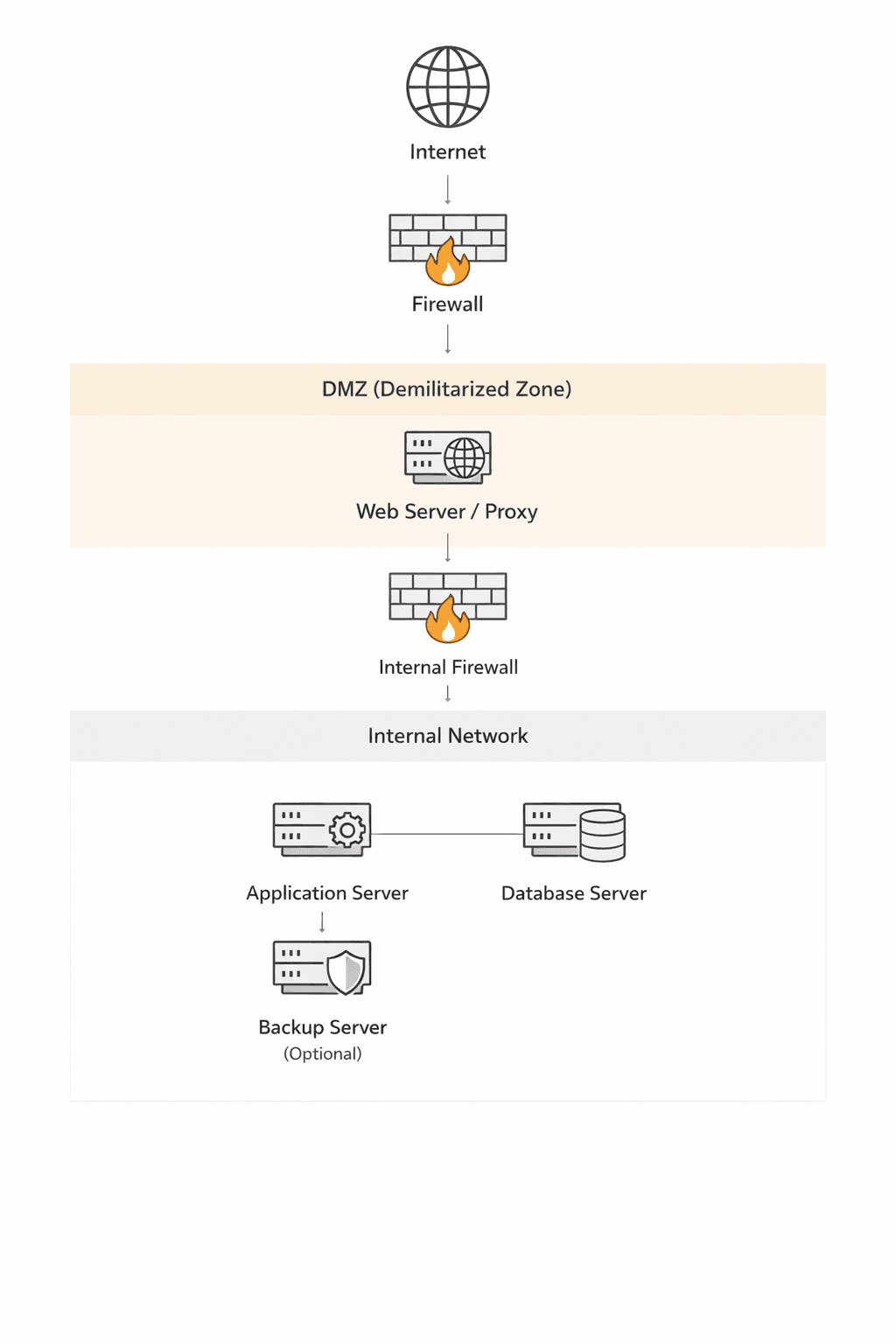
- Defense in Depth: If a DMZ-hosted server is compromised, the attacker is still blocked from the LAN by an internal firewall.
Modern Implementation Patterns
- Dual Firewall Architecture: The most secure standard, using a "front-end" firewall to screen internet traffic and a "back-end" firewall to protect the internal LAN from the DMZ.
- Virtual DMZs: Modern businesses often use VLANs (Virtual LANs) or network security groups in cloud environments (like Microsoft Azure) to create logical DMZs rather than relying on separate physical hardware.
- Hybrid Cloud: Organizations use a DMZ as a secure bridge between on-premises data centers and virtual private clouds
Key Business Use Cases (2026)
- Regulatory Compliance: Essential for meeting standards like HIPAA or PCI DSS, which require strict segmentation of sensitive data.
- IoT & OT Security: Used to isolate Industrial Control Systems (ICS) and Operational Technology (OT) that may have weaker built-in security than standard IT equipment.
- Third-Party Access: Hosting dedicated portals for vendors or partners in a DMZ to limit their exposure to the core corporate network
Strategic Evolution
While traditional DMZs focus on perimeter defense, businesses are increasingly layering them with Zero Trust Network Access (ZTNA). In this combined model, the DMZ provides the physical/logical isolation, while Zero Trust ensures that every access request within those zones is continuously verified
Why On-Premises Still Uses DMZs
- Perimeter Defense: It creates a physical or logical "buffer zone" where external-facing servers (Web, Email, DNS, FTP) reside, isolated from the core LAN.
- Compliance & Audit: Many industries (e.g., Healthcare under HIPAA) are legally required to use DMZs to prove that sensitive data is segmented from public access points.
- Legacy & OT Support: Industrial systems (OT) and older hardware often lack modern security; a DMZ provides the necessary external layer of protection they can't provide themselves.
Modern Implementation Standards (2026)
- Dual-Firewall (Back-to-Back): This is the gold standard. A "front-end" firewall screens internet traffic, while a "back-end" firewall sits between the DMZ and the LAN. An attacker must breach both to reach your private data.
- Micro-Segmentation via SDN: Modern data centers use Software-Defined Networking (SDN) like Cisco ACI or VMware NSX to create "virtual DMZs." This allows for more granular control than traditional hardware.
- Three-Tiered DMZ: Resources are split into three zones:
- Public-Facing: Web servers and APIs.
- Internal Services: Email and DNS.
- Backend/Database: Restricted access only for authorized applications.
- Secure Proxy Architecture: A best practice in 2026 is placing only Reverse Proxies or Load Balancers in the DMZ. No actual data is stored there; the proxy fetches what it needs from the LAN via strict, audited rules.
The Move Toward "Zero Trust"
While the DMZ handles North-South traffic (Internet to Data Center), modern on-prem designs now add Zero Trust principles for East-West traffic (server-to-server). This means even if a server inside your DMZ is compromised, it is still blocked from moving laterally to other servers because every connection requires its own authentication.
Why Organizations Still Choose Physical Servers
- Performance & Reliability: Physical servers offer unmatched performance by providing dedicated CPU, RAM, and storage resources without the "noisy neighbor" effect of virtualization.
- Security Isolation: Physical separation eliminates the risk of "guest-to-host" or "inter-VM" attacks where a compromised virtual machine might exploit the hypervisor to reach other systems.
- Predictability: Hardware resources are consistent and predictable, which is critical for resource-intensive applications like high-performance databases.
Security Best Practices for Physical DMZ Servers
When implementing physical hardware in a DMZ, you must compensate for the lack of software-defined flexibility with rigorous physical and network controls:
Dual Firewall (Back-to-Back) Architecture:
Place the server between two different firewall brands. The "external" firewall filters internet traffic, while the "internal" firewall prevents the DMZ server from reaching the LAN.
OS Hardening:
Perform a minimal installation to reduce the attack surface. Disable all unnecessary services, daemons, and user accounts.
Physical Access Security:
Secure the server in locked cabinets with biometric or RFID access logs to prevent unauthorized physical tampering. Implement surveillance and restricted facility access.
Network-Level Protection:
Use protected ports on the switch to prevent DMZ servers from communicating with each other (Private VLANs). Enforce multi-factor authentication (MFA) for all administrative access (SSH/RDP) to the server.
Strict Monitoring:
The DMZ is the "pointy end of the spear." Use Intrusion Detection Systems (IDS) and log all traffic and system changes.
Operational Considerations
- Maintenance: Unlike VMs, physical servers may require offline maintenance that could impact uptime if redundancy (like a second physical node) isn't in place.
- Scalability: Adding resources later will require purchasing new hardware, which is more time-consuming than scaling a VM
Triad of Isolation
To keep the client's physical server secure while maintaining LAN integrity, follow these "Triad of Isolation" rules:
1. The "Pinhole" Firewall Policy
Never allow the DMZ server to initiate a broad connection. Use a stateful firewall between the DMZ and the LAN with a "Pinhole" rule:
- Direction: One-way only (DMZ → LAN).
- Port Restriction: Limit traffic strictly to the database port (e.g., TCP 1433 for SQL Server or 3306 for MySQL).
- IP Locking: The rule must specify the exact static IP of the physical server and the exact IP of the database server. No ranges, no wildcards.
2. Move the Logic (App vs. Data)
Do not put the database in the DMZ. Keep the Data Layer on the internal LAN and only the Application/Web Layer on the physical server in the DMZ. If the physical server is breached, the attacker gets the application code but doesn't have direct access to the full database storage/backups.
3. Use a "Read-Only" or Proxy Gateway (Optional but Recommended) If the data is sensitive, consider these advanced buffers:
- Database Proxy: Place a proxy in the DMZ that validates queries before passing them to the LAN.
- Read-Only Replica: If the server only needs to display data, replicate a read-only copy of the database to a secondary internal server and point the DMZ server there. This prevents "Drop Table" or "Insert" attacks from reaching your primary records.
Summary Checklist for the Client/Organization:
| Component | Requirement |
|---|---|
| Physical Server | Must use a separate physical NIC for DMZ traffic. |
| DB Credentials | Use a unique service account with least privilege (no db_owner). |
| Encryption | All traffic between DMZ and LAN must be encrypted (TLS/SSL). |
| Logging | Enable SQL Audit logs to alert on any unusual query volume from the DMZ IP. |
Recommended Implementation Strategy
Least Privilege Database User
- Create a specific SQL user for this physical server.
- Grant SELECT permissions only on the specific tables or views required.
- Explicitly DENY permissions for INSERT, UPDATE, DELETE, and EXECUTE.
Use Database Views
Instead of giving the DMZ server access to raw tables, create Views. This masks the underlying table structure and ensures the server only "sees" the specific columns it needs, protecting sensitive internal metadata.
The "Data Diode" Logic (Network Level)
Configure the internal firewall to allow only established/related traffic back to the DMZ. If possible, use an Application Layer Gateway (ALG) or a Database Firewall that inspects the SQL traffic to ensure no "Write" commands (like DROP or TRUNCATE) are hidden inside the requests.
Read-Only Replica (The Gold Standard)
If the data doesn't need to be "live" to the millisecond, set up a Read-Only Replica of the database on the internal LAN. Point the DMZ server to this replica. Even if an attacker gains full admin rights to the DMZ server and manages to bypass the firewall, they are attacking a non-primary copy of the data.
Monitoring for "Data Exfiltration"
Since the server is pulling data, the primary risk is an attacker dumping the entire database. Set a threshold alert on your internal firewall or database logs: if the physical DMZ server suddenly pulls 1GB of data when it normally pulls 10MB, the connection should be automatically dropped.
1. Host-Based Firewalls (The "Software Firewall")
Since you lack a standalone appliance, you must use the built-in firewall on both the DMZ server and the Database server to act as your primary line of defense.
- On the DMZ Server: Configure iptables (Linux) or Windows Firewall to block all incoming traffic except for the specific public service (e.g., port 443 for web). Block all outgoing traffic except for a "pinhole" to the database server's specific IP and port.
- On the Database Server: Configure its local firewall to only accept incoming connections from the specific IP address of the physical DMZ server on the database port (e.g., TCP 1433 for SQL Server). Reject all other requests from that subnet.
2. Physical Port Isolation (VLANs)
You must physically segment the traffic at the switch level. Even without a hardware firewall, a managed switch can provide isolation: VLAN Assignment: Place the DMZ server's switch port on a completely different VLAN (e.g., VLAN 10) than the internal LAN (e.g., VLAN 20). Access Control Lists (ACLs): If your switch is "Layer 3" (routing-capable), apply ACLs to the VLAN interface. This acts as a "mini-firewall," allowing only specific traffic to pass between VLAN 10 and VLAN 20.
3. Dual-Homing (The Riskiest Method)
A common but risky "no-firewall" solution is to put two network interface cards (NICs) in the physical DMZ server—one connected to the internet and one connected to the LAN.
- The Danger: If an attacker gains "root" or "admin" access to the server, they can bridge the two networks, bypassing all isolation.
- Mitigation: If the client insists on this, you must disable IP Forwarding at the OS level to prevent the server from acting as a router for attackers.
4. Open-Source Alternatives
If the client's objection is cost rather than architecture, you can build a powerful "hardware-like" firewall using an old spare computer and open-source software like pfSense or OPNsense. This provides a dedicated security gateway for $0 in software costs. It allows you to implement Stateful Packet Inspection (SPI) which is significantly safer than simple switch ACLs.
Summary of Minimum Requirements Control Point Action DMZ Server OS Hardened; no "Write" permissions to the DB; IP Forwarding disabled. Network Switch Use VLANs and port-level ACLs to restrict traffic. Database Server Only listens to the DMZ server's IP; Read-Only user account.
The "Fortress Host" Strategy
Since the network won't help you, you must harden the OS of both machines: Strict Local Firewalls (IPsec/Windows Firewall/iptables)
- On the Database Server: Set a rule that says "Drop all traffic on Port [DB Port] unless it comes from Physical Server IP [X]."
- On the DMZ Server: Set a rule that says "Block all outgoing traffic except to Database Server IP [Y] on Port [DB Port]."
Physical "Air Gap" (Dual NICs)
The physical server will need two Network Interface Cards (NICs).
- NIC 1: Connected to the Internet gateway.
- NIC 2: Connected to the unmanaged switch (LAN).
CRITICAL: You must Disable IPv4 Forwarding in the OS settings. If you don't, an attacker who hits NIC 1 can use the server as a "bridge" to swim straight into your LAN via NIC 2.
Database Hardening
- Bind to IP: Configure the database service to listen only on its internal LAN IP, not 0.0.0.0 (all interfaces).
- Read-Only Account: Use a database user that can only SELECT. If the server is hacked, they can see data, but they can't delete your tables.
- Static IPs Only: Do not use DHCP for these machines. If an IP changes on an unmanaged switch, your host-based firewall rules will break or, worse, point to the wrong machine.
The Recommendation
Operating a business DMZ on an unmanaged switch is generally considered non-compliant for most insurance and industry standards (like PCI or HIPAA).
- Basic Managed Switch: This would allow you to use VLANs, which would provide 10x the security of the setup above.